Install the extension
Load the Chrome extension and sign in at trybeacon.space.
Your own signed-in Chrome. Works with Claude Code, Cursor and any MCP client.
Why
Pages change. Labels duplicate. “Click Submit” hits the wrong Submit. One id per control in every observe dump. Your agent uses that id, not a guess from visible text.
How it works
Load the Chrome extension and sign in at trybeacon.space.
Paste your one-time key into your client's MCP config (e.g. mcp.json). Bearer auth.
observe returns controls with ids. click, type, and run use those ids on your open tab.
Many agents
Each agent works in its own colour-coded Chrome tab group and only acts inside its own tabs. Several agents, and several Chrome profiles, can run in parallel. Your own tab stays untouched in agent mode, and a tab only comes forward when an agent needs a human.
WRONG_LANE error instead of acting.MCP
Tools: observe, click, type, press, scroll, navigate, run. Multi-step run executes without an LLM between steps. Focused observe (id, region, resetFocus) zooms one slice of the page for smaller dumps. The extension is the hands; the server is the relay. Use any MCP client that supports remote HTTP with Bearer auth — not only Cursor or Claude Code.
{
  "mcpServers": {
    "beacon": {
      "url": "https://mcp.trybeacon.space/mcp",
      "headers": { "Authorization": "Bearer bcn_…" }
    }
  }
}
Early access
Hosted chat in the Chrome side panel uses the same MCP relay as your logged-in browser — another way in besides your usual MCP client. Optional after setup; trial credits apply per account.
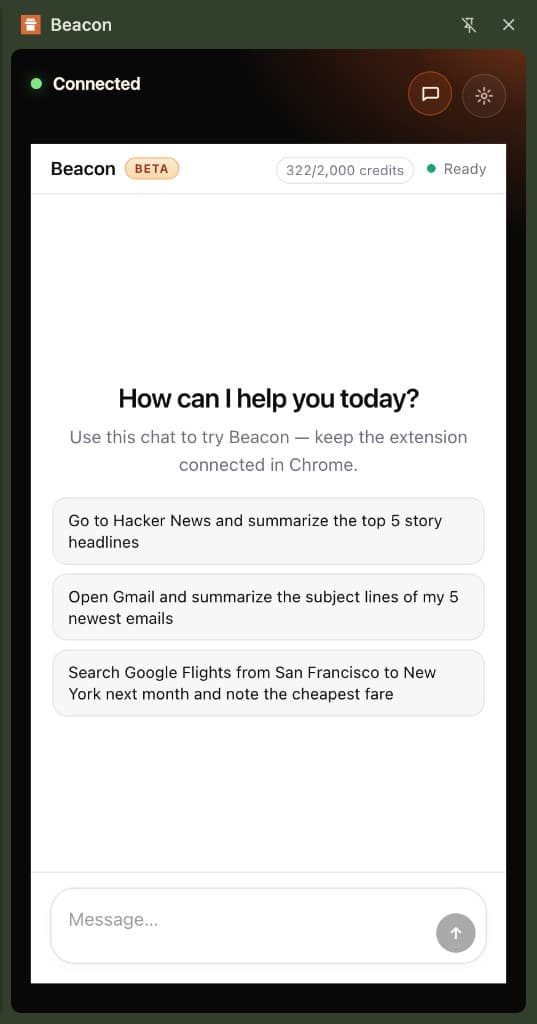
Setup walkthrough · Rolling out to beta accounts; same relay as MCP.
Pricing
Free
$0
Your Chrome, already logged in.
Custom
More
When 3 profiles or 5 agents is the limit.
FAQ
Problems people run into with tools like this, and how Beacon handles them.
Each agent works in its own lane: its own tab group and its own tabs. If an agent tries to act on another lane's tab, or on your tab, it gets a WRONG_LANE error instead of acting. Agents do not share a tab; each one works in its own.
Beacon is an MCP tool, so what it does depends on who is calling it and the instructions they give. The agent can only act inside its own tab group, and irreversible steps such as sending or paying are flagged so the agent can ask first. If you tell your agent to pay, it will; that is your instruction. Beacon does not block any category of site.
It asks you. The lane pauses and its tab comes forward so you can step in, while other lanes keep working.
That is prompt injection, and it is the same risk any agent takes when it reads the web. Beacon limits the reach by keeping the agent inside its own lane and flagging irreversible steps so it can ask first.
Your sessions, 2FA and cookies are already there, so there is no re-login and no sign-in walls to fight.
Any MCP client, including Claude Code and Cursor. Any client that supports remote MCP over HTTP with a Bearer header works: paste the mcp.json from setup into its MCP settings, or use claude mcp add for Claude Code or the Claude web connector. The optional beacon-browser skill on GitHub helps agents batch run steps and act by id.
Yes. One agent can work across both profiles.
The agent's commands, and what the page sends back, pass through the hosted relay to the extension. Treat it like any hosted service.
Beacon drives the tab you already have open, not a separate browser. A few sites ignore automated clicks or typing. Refresh the tab, reload the extension after an update, or finish that step yourself if the app is being stubborn.
You get a short text map of the page, not screenshots or a full DOM dump. When you only need one area, ask for a smaller slice instead of the whole page every time.
Use batched steps in one request when your client allows it. Observe when the page actually changes, not before every single action.
Install the extension, link your account from setup, and keep the site open in Chrome. Each snapshot lists your open tabs so you can target the right one.
Yes. It uses your Chrome profile and the sessions you already signed into. Beacon does not store your site passwords. The relay only carries traffic for automation you start. Details are in our Privacy policy.
No product can promise that. Beacon is for everyday web apps you already use: admin tools, messaging, travel, dashboards. Sites that block automation need their official API or a human in the loop.
Beacon keeps a small set: read the page, act on it, navigate. Prefer one batched run over long chains of single clicks when you can.
Beacon MCP is a Chrome extension and relay that exposes your logged-in browser to AI agents through the Model Context Protocol. Tools like observe, click, type, and run work on stable n## control ids from a text dump of the page — built for accuracy in Cursor, Claude Code, and other MCP clients.
Playwright MCP often drives a separate browser or huge snapshots. Beacon uses your existing Chrome profile and returns compact text observe maps with one id per control, so agents click the handle in the dump — not a label guess from a pixel or DOM soup.
Stable identity on controls, verify-after-act, batched steps, and your real sessions (cookies, SSO). Beacon optimizes for that: observe → act by id → expect in run batches, with NEEDS_HUMAN when a login wall or captcha blocks automation.
Yes — that is the primary use case. Point Chrome at your app, connect MCP, and automate QA or workflows while logged in. It is not aimed at defeating every anti-bot wall on public merchants.
Both labels fit. Browser automation is the outcome — click, type, navigate, fill forms, run checkouts in your Chrome. Browser MCP is how agents reach it: Model Context Protocol tools (observe, run, click) wired to the extension relay. Same product; MCP is the integration path for Cursor and Claude.
Many stacks send screenshots or huge DOM trees and hope the model picks the right element. Beacon returns a short text map with stable ids per control, then tools take that id. That is built for agent browser automation you can verify — batch run with expect gates instead of blind click loops.
Yes. Beacon is web automation in your existing Chrome profile — SSO, cookies, and tabs you opened. No separate bot browser. Your agent observes the tab you care about and acts there through MCP.
Common uses: click-through QA on staging, repeating multi-step flows in admin tools, form fills, and shopping or travel sites you are already logged into. Use batched run steps and stop before irreversible actions (pay, send) unless you add explicit expect checks.
A browser agent is an AI that observes the web and takes actions (click, type, navigate) toward a goal. Beacon is the hands for that agent in your Chrome: MCP tools plus stable control ids so the model drives your real session, usually from Cursor or Claude Code.
Cloud bots spin up a clean browser without your logins. A Beacon-backed browser agent uses your Chrome profile — same cookies, SSO, and tabs — which is what you want for internal tools and sites you already signed into. The agent loop stays observe → act by id → verify.
Security
Beacon runs through your Chrome profile. We hold relay credentials, not your site passwords.
One-time MCP keys
Minted at signup or rotation. We store a hash, not the secret.
Account passwords
Hashed with bcrypt. Standard web login for trybeacon.space only.
Your sessions stay yours
The relay does not log you into banks, email, or apps. You remain logged in as usual in Chrome.
Rotate anytime
Invalidate a leaked key from account and paste a new config in your MCP client.
Learn more
Still in the fog?